Finished Today's Deliveries & Retrievals
1. Page Objectives
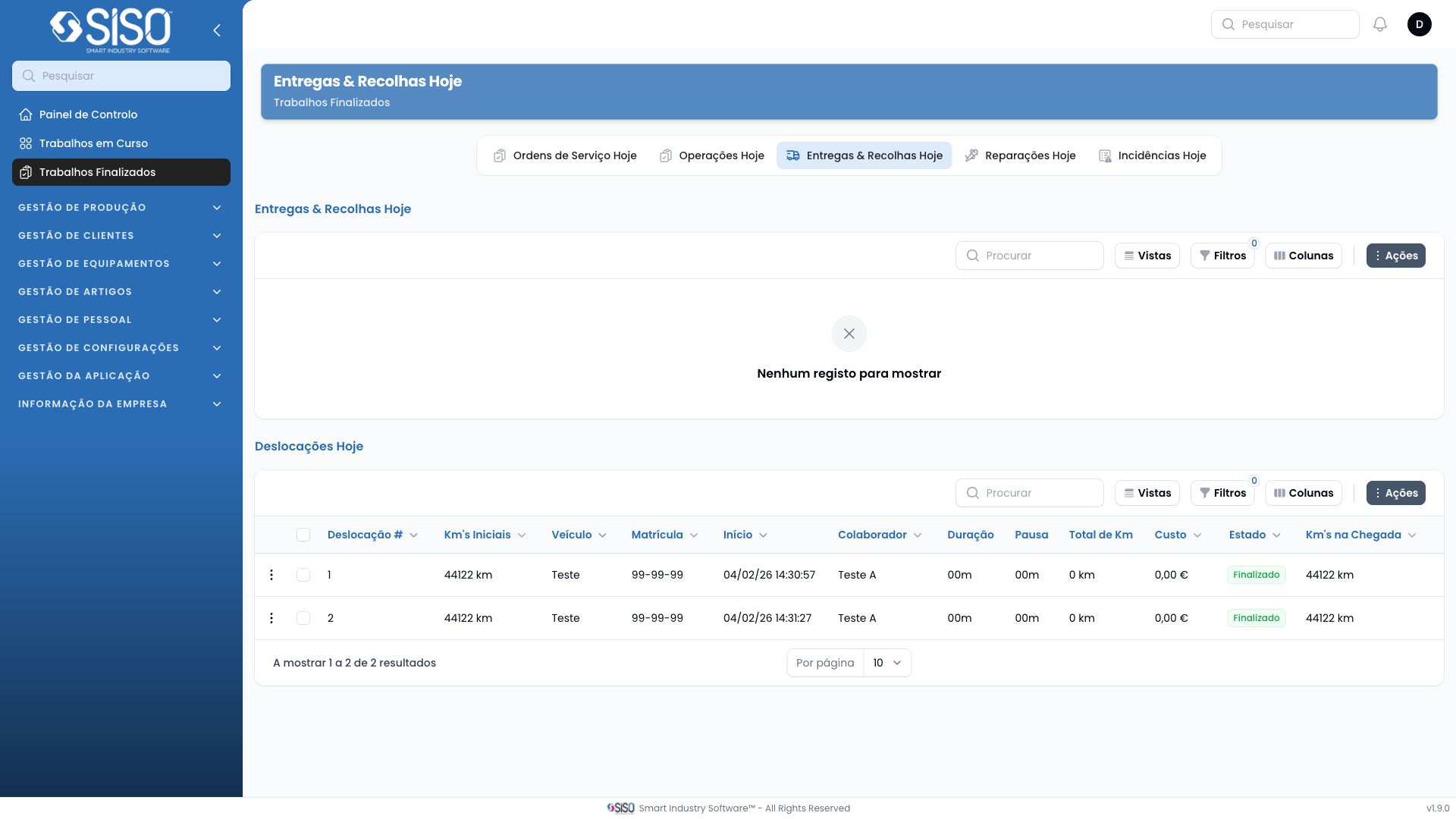
This page provides a detailed view of finished today retrievals and deliveries. It allows users to view, filter, and export details related to these activities.
2. Tables
The page contains two different tables. Each table presents information about the retrievals and deliveries or trips completed during the day.
2.1. Today's Retrievals & Deliveries
This table lists all retrievals and deliveries completed during the day, providing detailed information about the vehicle, employee responsible, and more.
2.1.1. Table Actions
- Export All: Allows the user to export all the records from the table. Once exported, they can be downloaded in .csv or .xlsx formats.
2.1.2. Columns
| Field | Description |
|---|---|
| Work Order | Associated work order. |
| Km's on Client | Number of kilometers recorded on the vehicle's odometer when it arrived at the client's location. |
| Start | Date and time when the work begun. |
| Operation | Type of operation (retrieval or delivery). |
| Client | Name of the client where the operation is done. |
| Address | Physical location where the work is done. |
| Employee | Name of the employee doing the operation. |
| Information | Information about what was retrieved or delivered. |
| Duration | Total time spent on the operation. |
| Pause | Time taken for breaks or pauses during the operation. |
| Cost | Cost associated with completing the operation. |
| Status | Current state of the operation. |
2.1.3. Filters
- Operation: The specific operation associated with the data.
- Employee: The specific employee associated with the data.
- Client: The specific client associated with the data.
2.1.4. Record Actions
This table does not have record actions.
2.2. Today's Trips
This table provides detailed information about the trips that were made during the day. It contains information such as travel number, kilometers covered, vehicle used, and the status of the trip.
2.2.1. Table Actions
- Export All: Allows the user to export all the records from the table. Once exported, they can be downloaded in .csv or .xlsx formats.
2.2.2. Columns
| Field | Description |
|---|---|
| Travel # | Unique identifier for the trip. |
| Initial Km's | Initial kilometers before starting the trip. |
| Vehicle | Vehicle used for the trip. |
| Plate Number | Plate number of the vehicle. |
| Start | Time when the trip started. |
| Employee | Employee responsible for the trip. |
| Duration | Duration of the trip. |
| Pause | Time paused during the trip. |
| Total Km | Total kilometers traveled during the trip. |
| Cost | Cost associated with the trip. |
| Status | The current status of the trip. |
| Km's on Arrival | Kilometers at the time of arrival. |
2.2.3. Filters
- Status: Status of the trip.
2.2.4. Record Actions
- View: View more details about the trip.
- Timeline: Shows a timeline with all the relevant information about the trip.