Clients
1. Page Objectives
The Clients page allows the user to manage and view all the clients within the system. It provides an overview of client information, such as ERP ID, name, tax payer number, and contact details, making it easy to manage client relationships and details efficiently.
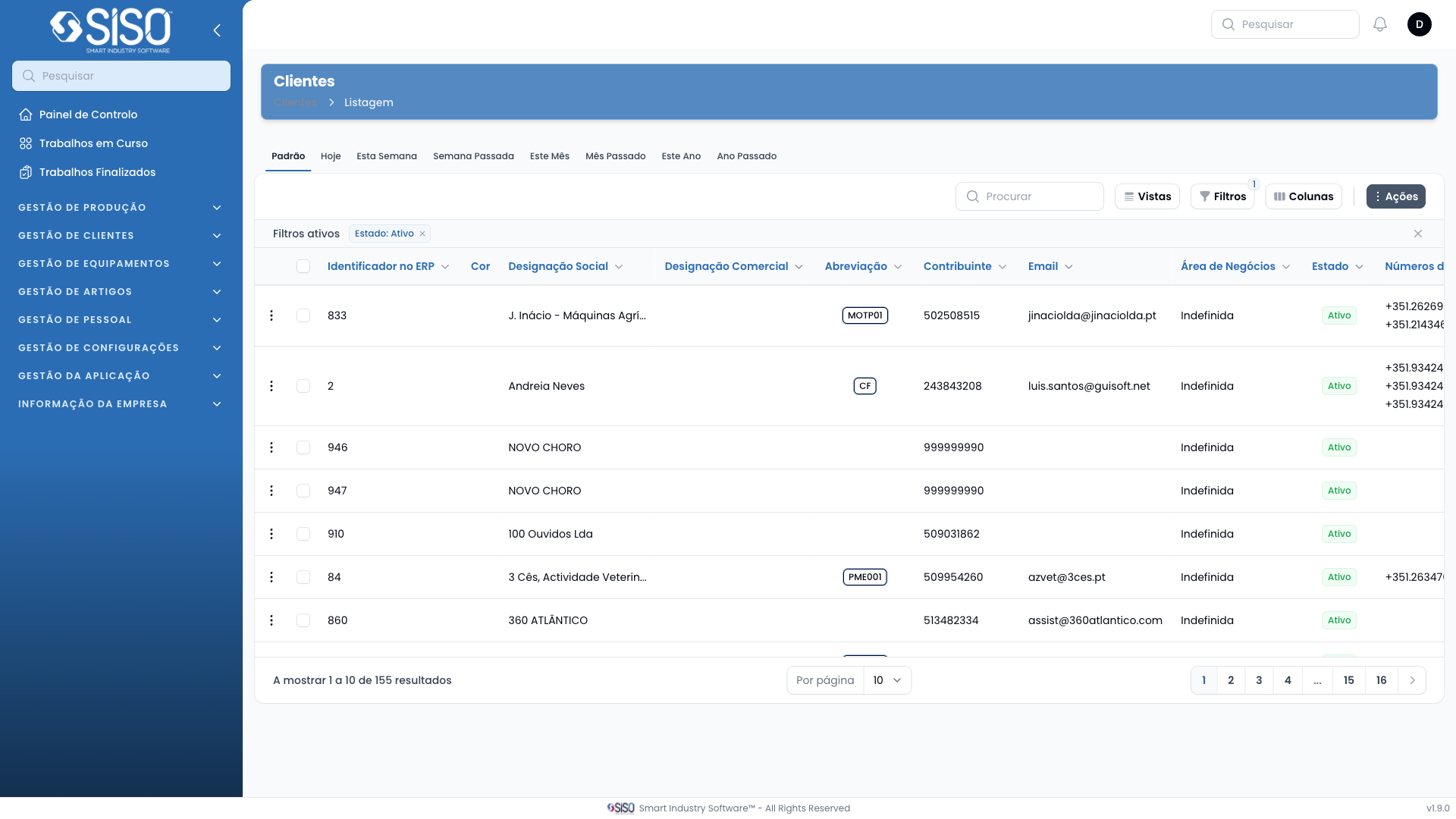
2. Table
The table displays a list of clients with essential information such as ERP ID, color-coded status, name, tax payer number, email, and business area. This allows users to quickly understand the current state of clients and access important information at a glance.
2.1. Table Actions
- Generate Recapitulatives: Allows users to generate a recap of the selected client's details.
- Edit: Opens the form to edit the details of the selected client.
- Import from ERP: Imports client data from an ERP system.
- Export All: Exports the complete list of clients as a report.
2.2. Columns
| Field | Description |
|---|---|
| ERP ID | Unique identifier for the client in the ERP system. |
| Color | Color-coded status representing the client's priority level. |
| Name | The name of the client. |
| Abbreviation | A short form or code for the client's name. |
| Tax Payer Number | The client's tax identification number. |
| The primary email address for the client. | |
| Business Area | The industry or sector the client operates in. |
| Status | Shows whether the client is active or inactive. |
| Contact Numbers | Phone numbers associated with the client. |
| Priority | The client's priority level within the system. |
| Created at | The date the client was added to the system. |
2.3. Filters
- Business Area: Allows the user to filter clients based on the business area (e.g., Restaurants, Alimentação e Bebidas).
- Status: Filters clients based on their current status, such as Active or Inactive.
- Created from / Created until: Filters clients based on the date range of their creation in the system.
2.4. Record Actions
- Generate Recapitulative: Generates a report for the selected client.
- Edit: Opens the edit form for the selected client to update their details.