Activity Logs
1. Page Objectives
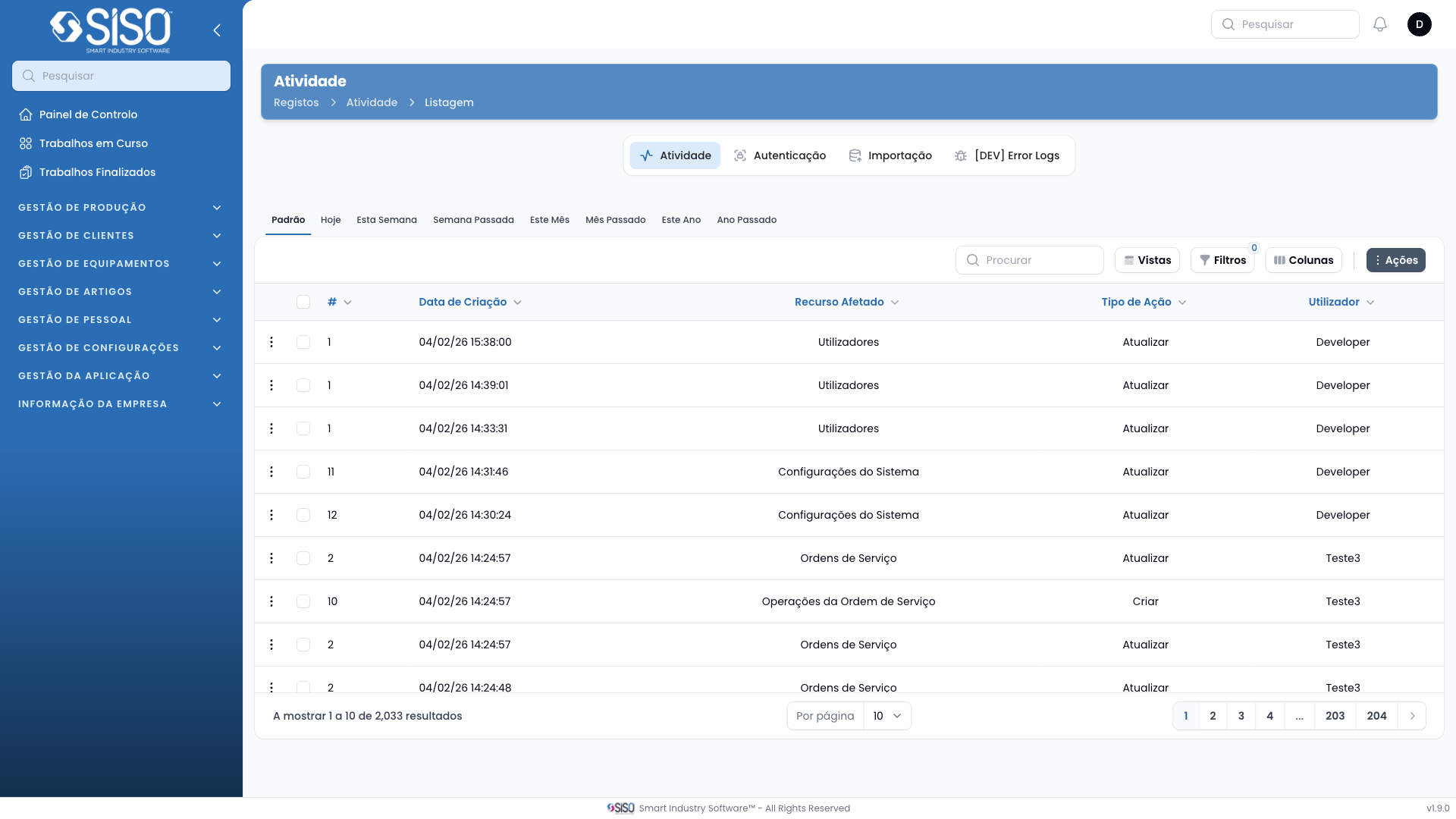
The Activity Logs page provides a detailed record of user actions and system changes in the platform. It allows users to review, filter, and export logs to monitor system activities.
2. Table
The table displays log entries with details such as the time of the action, the affected resource, and the type of action performed. Users can use this table to track changes and actions across the platform.
2.1. Table Actions
- View Details: Allows users to view the details of a specific log entry.
- Export All: Exports the log data for external use.
2.2. Columns
| Field | Description |
|---|---|
| Created At | Displays the date and time the action occurred. |
| ID | Shows the unique identifier of the log entry. |
| Affected Resource | Indicates which resource was affected by the action. |
| Action Type | Specifies the type of action (e.g., Update, Delete). |
| User | Displays the user responsible for the action. |
2.3. Filters
- Affected Resource: Allows users to filter logs by the specific resource that was affected (e.g., users, items).
- Action Type: Filters logs by the type of action performed (e.g., Update, Delete).
- Created From/Until: Enables filtering logs by a specific time range.
- User: Filters logs by the user responsible for the action.
2.4. Record Actions
- View Details: Opens detailed information about the selected log entry, including additional metadata related to the action.