How to Manage Client Requests
This guide explains how client requests are managed, both from the perspective of the internal team and from the perspective of the client.
Prerequisites
- A client request must already exist (Learn How Clients Can Create a Client Request)
Steps to Follow
1. Understand the Client Request Flow
Client requests can move through several states depending on how they are analyzed and handled. Not all requests need to go through every state.
In most cases, the flow is simple and direct, moving only through the necessary states until completion.
2. Identify the Initial Request State
When a client creates a request in the client area, the request enters the New state.
While the request has not yet been reviewed by the internal team, it remains in the New state.
3. Place the Request Under Review
When the internal team is ready to evaluate the request, the request should be moved to the Under Review state.
This state indicates that the request is currently being reviewed and handled.
4. Choose the Next Request State
After reviewing the request, the internal team should decide the most appropriate next state.
The possible options are:
- Accepted
- Rejected
- Pending Client
5. Handle an Accepted Request
If the request is placed in the Accepted state, it then moves to In Resolution.
When the situation has been handled, the request should move to the Resolved state.
If the client does not perform any action within the following 15 days, the request automatically moves to the Closed state.
6. Handle a Rejected Request
If the request is placed in the Rejected state, the client can reopen it within 15 days if they disagree with the decision.
If the client does not take any action within that period, the request automatically moves to the Closed state.
If the request is reopened, it returns to the Under Review state for a new evaluation.
7. Handle a Request Pending Client
If additional information is required to continue the review, the request should move to the Pending Client state.
In this state, the internal team waits for the client to respond with the missing information.
8. Receive the Client Response
When the client replies with the requested information, the request can continue through the normal review flow.
After receiving the response, the request should be reviewed again by the internal team to make a decision.
If the client does not respond within 15 days, the request automatically moves to the Closed state.
If the request is reopened later, it returns to the Under Review state.
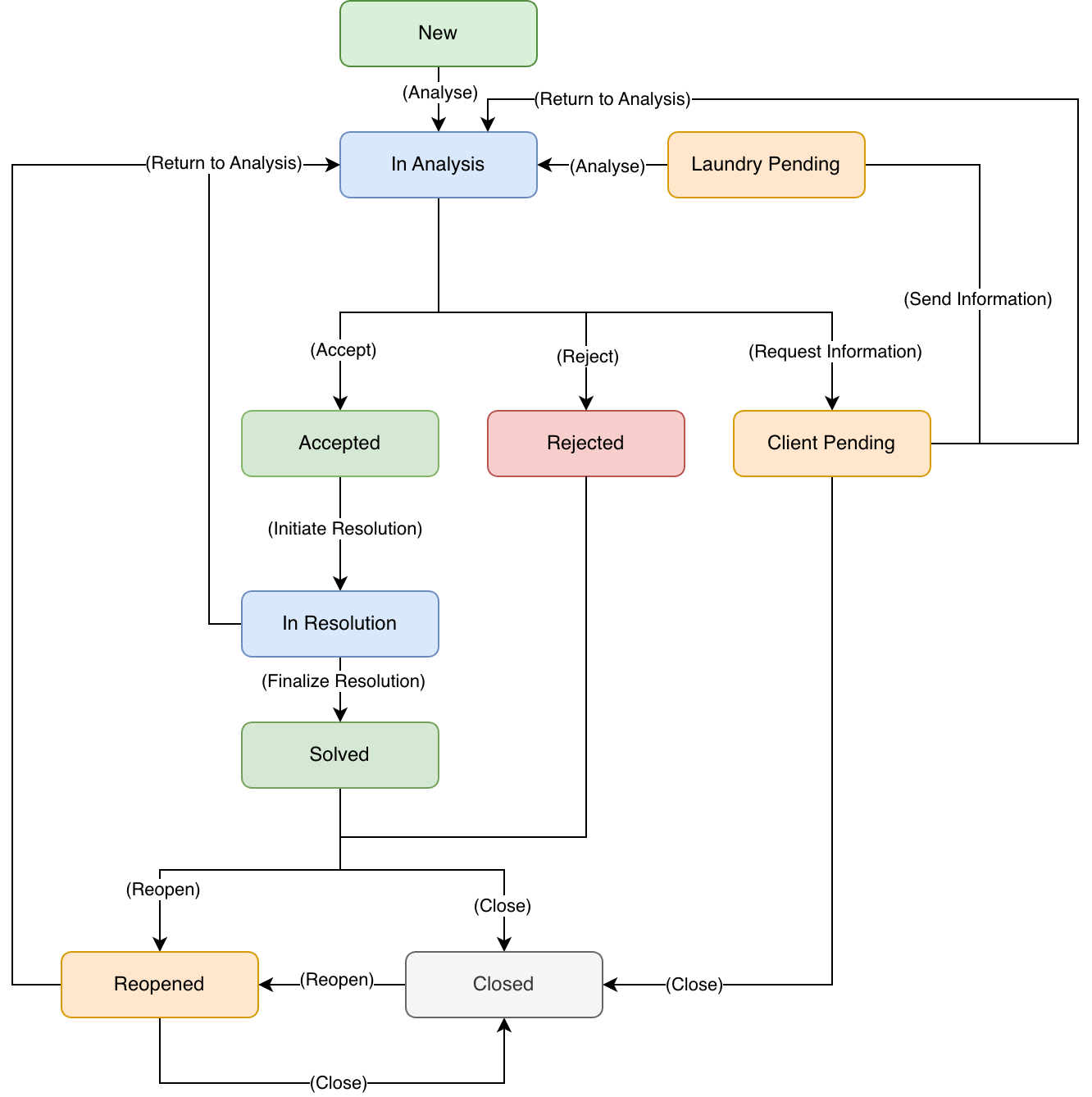
Client Request State Flow
Client requests can follow different paths depending on the situation and the information available.
Most Common Scenarios
Simple Request Accepted and Resolved
This is the most common flow when the request can be handled without needing additional information.
Example
Situation: the client reports stained clothing.
Flow
- The client creates the request
- The request enters New
- The internal team moves the request to Under Review
- The request is Accepted
- The request moves to In Resolution
- After handling the situation, the request moves to Resolved
- If there is no further interaction for 15 days, the request moves to Closed
Request That Requires More Information
This flow is used when the request does not contain enough information to make an immediate decision.
Example
Situation: the client reports damaged clothing but does not identify the specific article or the context of the issue.
Flow
- The client creates the request
- The request enters New
- The internal team moves the request to Under Review
- The request moves to Pending Client
- The client replies with the missing details
- The request returns to Under Review
- The internal team decides whether the request should be Accepted or Rejected
Rejected Request
This flow applies when the request cannot be validated.
Example
Situation: the client reports an issue outside the allowed time frame or one that has already been reviewed previously without grounds for further action.
Flow
- The client creates the request
- The request remains in New or moves to Under Review
- The internal team reviews the request
- The request moves to Rejected
- The client may reopen the request within 15 days
- If no further action occurs, the request automatically moves to Closed
Additional Notes
- The system does not require all requests to pass through every state
- In many cases, the flow is linear: Under Review > Accepted > Resolved > Closed
- The Rejected state does not represent an error in the process, but a documented decision
- The Pending Client state allows additional information to be requested without creating new requests or losing the history
- Whenever a request is reopened, it returns to the Under Review state
Roles in the Process
| Role | Responsibility |
|---|---|
| Client | Create requests and respond when additional information is requested |
| Administration | Review, accept, reject, request additional information, resolve, and monitor requests |