Vehicles
1. Page Objectives
The Veículos page displays a list of vehicles managed by the company, showing various attributes related to vehicle information, inspection dates, and registration details. This page allows users to view, filter, and manage vehicles used in the company.
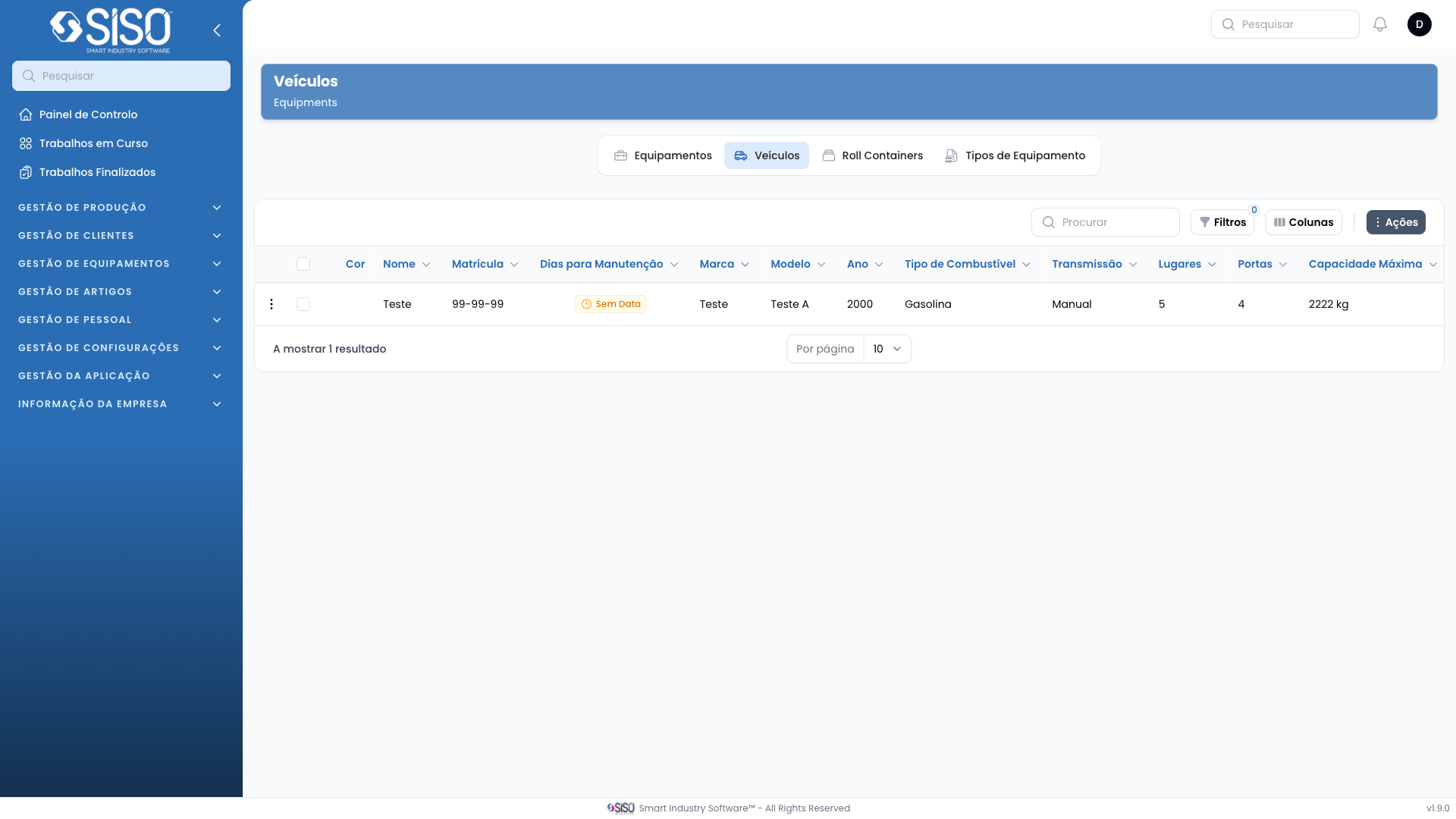
2. Table
The table contains detailed information about each vehicle, including its name, registration number, engine details, fuel consumption, and more.
2.1. Table Actions
- Criar Veículo: Opens the form to create a new vehicle entry.
- Editar Veículo: Allows users to edit the selected vehicle’s information.
- Export All: Exports the complete list of vehicles to a file.
2.2. Columns
| Field | Description |
|---|---|
| Cor | The color of the vehicle. |
| Nome | The name/model of the vehicle. |
| Matrícula | The registration number of the vehicle. |
| Marca | The manufacturer of the vehicle. |
| Modelo | The model of the vehicle. |
| Ano | The year the vehicle was manufactured. |
| Tipo de Combustível | The type of fuel used by the vehicle (e.g., Diesel, Elétrico). |
| Transmissão | The type of transmission (Manual or Automatic). |
| Lugares | The number of seats in the vehicle. |
| Portas | The number of doors in the vehicle. |
| Capacidade Máxima | The maximum carrying capacity of the vehicle in kg. |
| Quilometragem Atual | The current mileage of the vehicle in km. |
| Preço por Km | The cost per kilometer driven. |
| Data de Inspeção | The date of the vehicle's last inspection. |
| Data de Registo | The date the vehicle was registered. |
| País de Registo | The country where the vehicle was registered. |
| Número de Chassis | The chassis number of the vehicle. |
| Cavalo | The horsepower of the vehicle. |
| Cilindrada | The engine displacement in cc. |
| Consumo de Combustível | The fuel consumption of the vehicle. |
| Capacidade do Depósito | The fuel tank capacity in liters. |
| Categoria do Veículo | The category of the vehicle (e.g., Pesado de Mercadorias, Ligeiro). |
2.3. Filters
- Created from: Filters records based on the creation date of the vehicles, allowing the user to choose a start date.
- Created until: Filters records based on the creation date of the vehicles, allowing the user to choose an end date.
- Status: Filters records by the vehicle's status (Active, Inactive, All).
2.4. Record Actions
- Editar Veículo: Opens the selected vehicle’s data for editing, allowing updates to the existing information.
- Deletar Veículo: Deletes the selected vehicle from the list.